acrolinx-sidebar-demo
Acrolinx Sidebar Demo

This is a showcase for integrating the Acrolinx Sidebar into a web application.
See: Build With Acrolinx
Live Demo
Acrolinx Sidebar Web Live Demo
The Acrolinx Sidebar
The Acrolinx Sidebar is designed to show up beside the window where you edit your content. You use it for checking, reviewing, and correcting your content. To get an impression what the Sidebar looks like in existing integrations, have a look at Sidebar Quick Start.
Prerequisites
Please contact Acrolinx SDK support for consulting and getting your integration certified. This sample works with a test license on an internal Acrolinx URL. This license is only meant for demonstration and developing purposes. Once you finished your integration, you’ll have to get a license for your integration from Acrolinx.
Acrolinx offers different other SDKs, and examples for developing integrations.
Before you start developing your own integration, you might benefit from looking into:
- Build With Acrolinx,
- the Guidance for the Development of Acrolinx Integrations,
- the Acrolinx SDKs, and
- the Acrolinx Demo Projects.
Getting Started
Run Locally in a Web Browser
- Make sure that you have installed NodeJS that includes npm.
-
In your console, navigate into the projects root folder and install all the required node modules with:
npm install -
Now, you can start the development server by typing:
npm start - Now, open http://localhost:3000/samples in your web-browser.
-
Choose the sample that you want to see. Use
https://partner-dev.internal.acrolinx.sh/as the Acrolinx URL.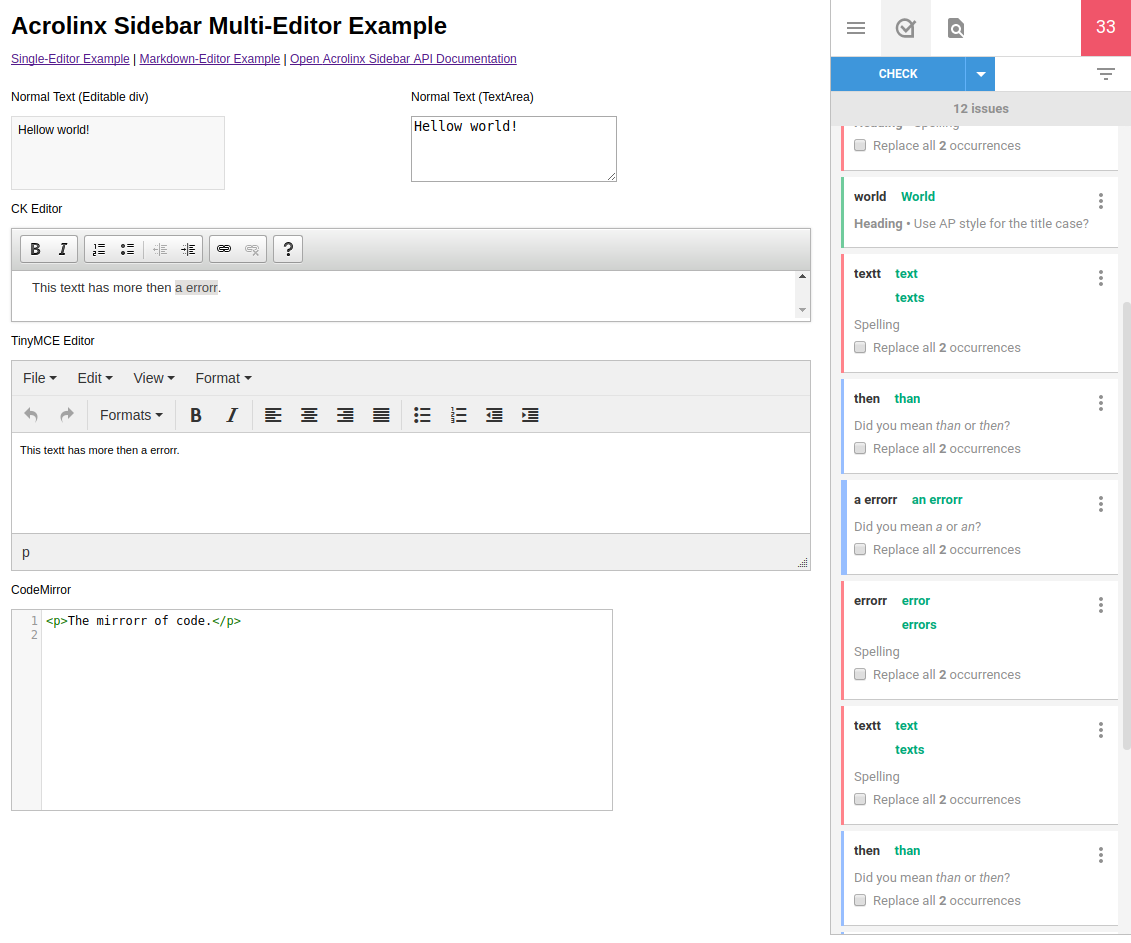
The best entry point might be the Multi-Editor Example.
Using the SDK
To install the SDK to your npm-based Acrolinx Integration project call:
npm install @acrolinx/sidebar-sdk
⚠️ WARNING: unpkg CDN Usage
Some samples in this repository load the Acrolinx Sidebar SDK directly from unpkg (e.g.,
https://unpkg.com/@acrolinx/sidebar-sdk/dist/index.js). This approach is provided for demonstration and development purposes only and should NOT be used in production environments.Reasons to avoid unpkg in production:
- Acrolinx does not own or control the unpkg.com domain
- We cannot guarantee availability, performance, or security of third-party CDN services
- There are potential risks including service outages, breaking changes, and supply chain vulnerabilities
- Production integrations require controlled, versioned dependencies
For production use:
- Always install the SDK via npm/yarn as a direct dependency in your project
- Bundle the SDK with your application using your build tools (webpack, vite, rollup, etc.)
- Host all dependencies on infrastructure you control
- Use the Integration Boilerplate Sample as a reference for proper production setup
Integration Boilerplate Sample
See: Boilerplate using Node and NPM
Configuration
See: config.js
SDK Features
The SDK provides adapters for:
contentEditablediv-elements,inputtext elements,- CodeMirror,
- CKEditor,
- Xeditor,
- TinyMCE, and a
MultiEditorAdapterthat can be used to combine different adapters as one document.
If you need to support other editors, sometimes the ContentEditableAdapter works without any changes.
If not, implement the AdapterInterface.
References
- This DEMO is built on the Sidebar SDK JS.
- The Sidebar SDKs are based on the Acrolinx Sidebar Interface.
License
Copyright 2015-present Acrolinx GmbH
Licensed under the Apache License, Version 2.0 (the “License”); you may not use this file except in compliance with the License. You may obtain a copy of the License at:
http://www.apache.org/licenses/LICENSE-2.0
Unless required by applicable law or agreed to in writing, software distributed under the License is distributed on an “AS IS” BASIS, WITHOUT WARRANTIES OR CONDITIONS OF ANY KIND, either express or implied. See the License for the specific language governing permissions and limitations under the License.
For more information visit: https://www.acrolinx.com